Data Entry Typing Test: Free Practice, KPH Benchmarks & Tips (2026)
Take a free data entry typing test, convert WPM to KPH, see the speed employers expect for data entry jobs, and practice with 10-key tips and drills.
Table of Contents
A data entry typing test measures how fast and how accurately you can type real-world information such as names, addresses, invoice numbers and dates. If you are applying for a data entry, administrative or customer service job, there is a good chance the employer will ask you to take one before the interview.
The good news: a data entry typing test is very predictable. Once you understand how it is scored (WPM, KPH and accuracy), which formats employers use, and what speed is "good enough", you can prepare in two weeks and walk into the test with confidence. This guide covers everything, with conversion tables, benchmarks, a 14-day practice plan and the most common mistakes candidates make.
Quick start: Want your baseline right now? Take our free typing test (1, 3 or 5 minutes, no sign-up) and write down your WPM and accuracy. You will use these two numbers throughout this guide.
What Is a Data Entry Typing Test?
A data entry typing test is a timed exercise in which you copy information from a source (a paragraph, a list of records, a scanned form or a column of numbers) into a field on the screen. The software then calculates:
Speed, as words per minute (WPM) or keystrokes per hour (KPH)
Accuracy, as the percentage of characters typed correctly
Net speed, which is your speed after errors are subtracted
Unlike a general typing test that uses flowing sentences, a data entry typing test usually contains mixed content: capital letters, numbers, punctuation, email addresses, postal codes, currency amounts and dates. That is exactly what data entry clerks type all day, so it is what employers want to measure.
Who has to take a data entry typing test?
Role | Why the test is used | What is usually tested |
|---|---|---|
Data entry clerk / keyer | Core skill of the job | Alphanumeric records, KPH |
Administrative assistant | Emails, forms, scheduling | WPM on text + accuracy |
Medical records / billing | Patient and insurance data | Alphanumeric + numbers, high accuracy |
Accounting / payroll clerk | Invoices, amounts, IDs | 10-key (numeric) KPH |
Customer service agent | Notes during live calls | WPM on short text |
Remote / freelance data entry | Proof of skill for clients | WPM + accuracy certificate |
Take a Free Data Entry Typing Test Now
Before reading further, measure where you are today. On TypingTest.one you can:
Open the free typing test and choose Classic mode.
Pick 3 minutes (closest to most employer tests) or 5 minutes for a full simulation.
Select the Technical category to get more numbers and symbols, which is closer to real data entry.
Type without stopping, then write down your WPM and accuracy.
Repeat the test three times and keep your average, not your best score. Employers see one attempt, so your average is your real level.
Tip: If you are a beginner, start with our free typing lessons before timing yourself. Correct finger placement matters more than raw speed in the first week.
WPM vs KPH: How Data Entry Speed Is Measured
Most typing tests report WPM (words per minute). Many data entry employers, however, talk in KPH (keystrokes per hour) because data entry is not made of normal words: an invoice number like INV-2026-08841 is one "word" for a human but 14 keystrokes for a keyboard.
How WPM is calculated
In typing tests, a "word" is standardized as 5 characters (spaces and punctuation included). So:
WPM = (characters typed ÷ 5) ÷ minutes
If you type 1,000 characters in 5 minutes, that is 200 "words" in 5 minutes, which equals 40 WPM.
How KPH is calculated
KPH = keystrokes typed ÷ hours
If you type 1,000 keystrokes in 5 minutes, multiply by 12 (there are 12 five-minute blocks in an hour): 12,000 KPH.
The simple conversion rule
Because one standard word = 5 keystrokes and one hour = 60 minutes:
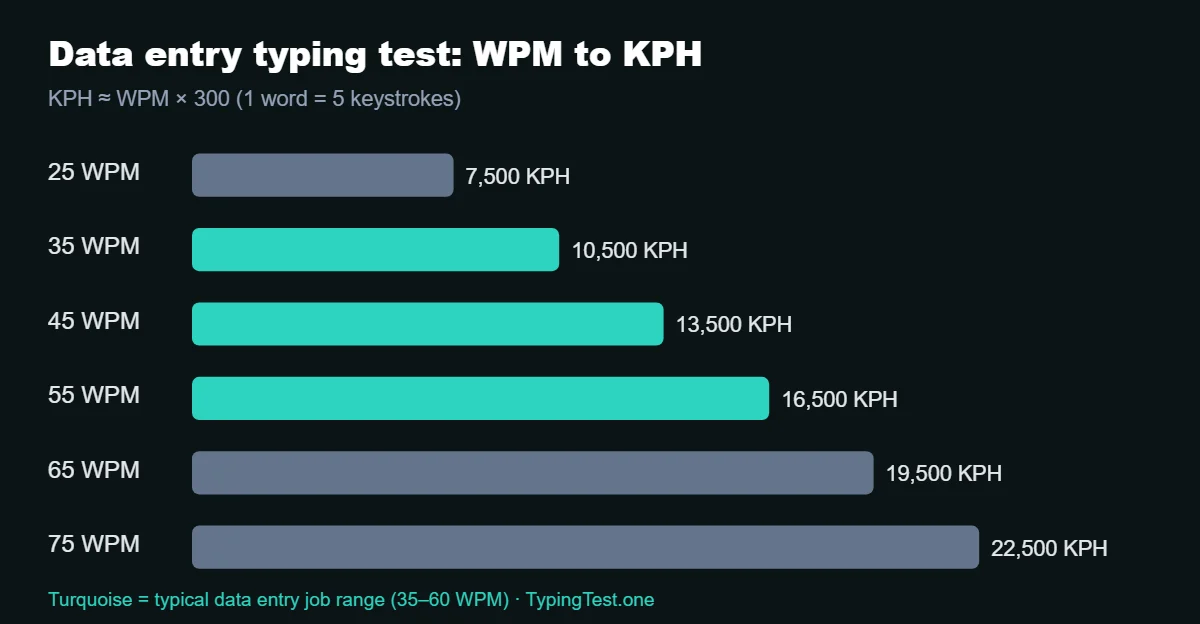
KPH ≈ WPM × 300 and WPM ≈ KPH ÷ 300
This is the formula to use when a job ad asks for "10,000 KPH" and your typing test shows WPM.
WPM to KPH Conversion Table
Your WPM | Equivalent KPH | What it means for data entry |
|---|---|---|
25 WPM | 7,500 KPH | Beginner, below most job requirements |
30 WPM | 9,000 KPH | Close to the minimum for some entry-level roles |
35 WPM | 10,500 KPH | Entry-level threshold for many employers |
40 WPM | 12,000 KPH | Solid entry-level, passes most tests |
45 WPM | 13,500 KPH | Comfortable pass for standard data entry |
50 WPM | 15,000 KPH | Above average, competitive candidate |
60 WPM | 18,000 KPH | Strong, suitable for high-volume roles |
70 WPM | 21,000 KPH | Expert level |
80 WPM | 24,000 KPH | Top tier, rare among applicants |
Conversion based on the standard 5-keystroke word. Real KPH on alphanumeric records can be slightly lower than this estimate because of shift keys, symbols and switching between letters and numbers.
What Speed Do Data Entry Jobs Require?
There is no single official standard, but employer testing providers publish clear ranges. EmployTest, a pre-employment testing company, describes 40 WPM net as a reasonable starting benchmark for office and administrative roles, and around 45 to 60 WPM for customer service and data entry roles (EmployTest).
In practice, job ads usually fall into these bands:
Job level | Typical WPM asked | Approximate KPH | Accuracy expected |
|---|---|---|---|
Entry-level data entry | 35–45 WPM | 10,500–13,500 | 95% or higher |
Standard data entry clerk | 45–60 WPM | 13,500–18,000 | 97% or higher |
High-volume / senior | 60–75 WPM | 18,000–22,500 | 98% or higher |
Numeric (10-key) roles | measured in KPH only | 8,000–12,000+ numeric KPH | 98% or higher |
Bottom line: if your average on a 3-minute data entry typing test is 45 WPM with 97% accuracy, you will pass the majority of entry-level and standard data entry tests. Below 35 WPM, focus on practice before applying.
The 4 Types of Data Entry Typing Tests Employers Use
1. Standard typing test (WPM)
You copy a paragraph of normal text for 1, 3 or 5 minutes. It measures general typing speed and accuracy. EmployTest, for example, offers 1, 3 and 5-minute timed options scored on gross WPM, net WPM and errors (EmployTest).
How to prepare: daily timed tests on our 1-minute typing test guide and the 3-minute typing test guide.
2. Alphanumeric data entry test (KPH)
You type contact or customer records: names, street addresses, cities, ZIP codes, phone numbers and emails, usually field by field with the Tab key between fields. This is the most realistic data entry typing test.
Example record:
Field | Value |
|---|---|
Name | Maria J. Delgado |
Address | 4417 W. Lincoln Ave, Apt 12B |
City / ZIP | Tucson, AZ 85704 |
Phone | (520) 555-0193 |
m.delgado84@example.com |
What makes it hard: capital letters, periods, apartment numbers, parentheses and the @ symbol slow most people down.
3. Numeric data entry test (KPH)
Rows of numbers, amounts and IDs, for example 00418273, 1,245.60, 07/14/2026. Common for accounting, payroll, inventory and billing roles.
4. 10-key test (numeric keypad)
Only the numeric keypad on the right side of the keyboard is used. Scored in KPH with very high accuracy expectations. See the dedicated 10-key section below.
Comparison of the four formats
Test type | Measured in | Typical length | Main difficulty | Best practice method |
|---|---|---|---|---|
Standard typing | WPM | 1–5 min | Consistency | Daily timed tests |
Alphanumeric | KPH or WPM | 3–10 min | Capitals, symbols, Tab key | Copy real forms |
Numeric | KPH | 3–10 min | Number row vs keypad | Number drills |
10-key | KPH | 3–5 min | Keypad accuracy | Keypad-only drills |
5-Minute vs 10-Minute Data Entry Typing Tests
The two most searched versions are the 5-minute and the 10-minute data entry typing test.
5-minute test | 10-minute test | |
|---|---|---|
What it measures | Speed + accuracy | Speed, accuracy and endurance |
Typical score vs 1-minute test | Slightly lower | Lower again (fatigue) |
Biggest risk | Starting too fast | Losing focus after minute 6 |
How to train | Two 5-minute tests back to back, no break |
Key insight: most people lose 5 to 15% of their 1-minute speed on a 5-minute test. If an employer requires 40 WPM on a 5-minute test, aim for about 45 WPM on 1-minute tests during practice.
How Accuracy Changes Your Score
In a data entry typing test, accuracy is not a detail; it is the job. A wrong digit in an invoice or a patient record costs far more than a slow keystroke.
Most tests calculate net WPM, which subtracts errors:
Net WPM = Gross WPM − (errors ÷ minutes)
Gross WPM | Errors in 5 min | Net WPM | Accuracy impression |
|---|---|---|---|
55 | 2 | 54.6 | Excellent |
55 | 10 | 53 | Acceptable |
55 | 25 | 50 | Risky for data entry |
65 | 40 | 57 | Fast but unreliable, often rejected |
Rule of thumb: a candidate with 45 WPM and 98% accuracy is usually preferred over a candidate with 60 WPM and 90% accuracy. Slow down until you are consistently above 97%, then build speed.
10-Key (Numeric Keypad) Data Entry Test
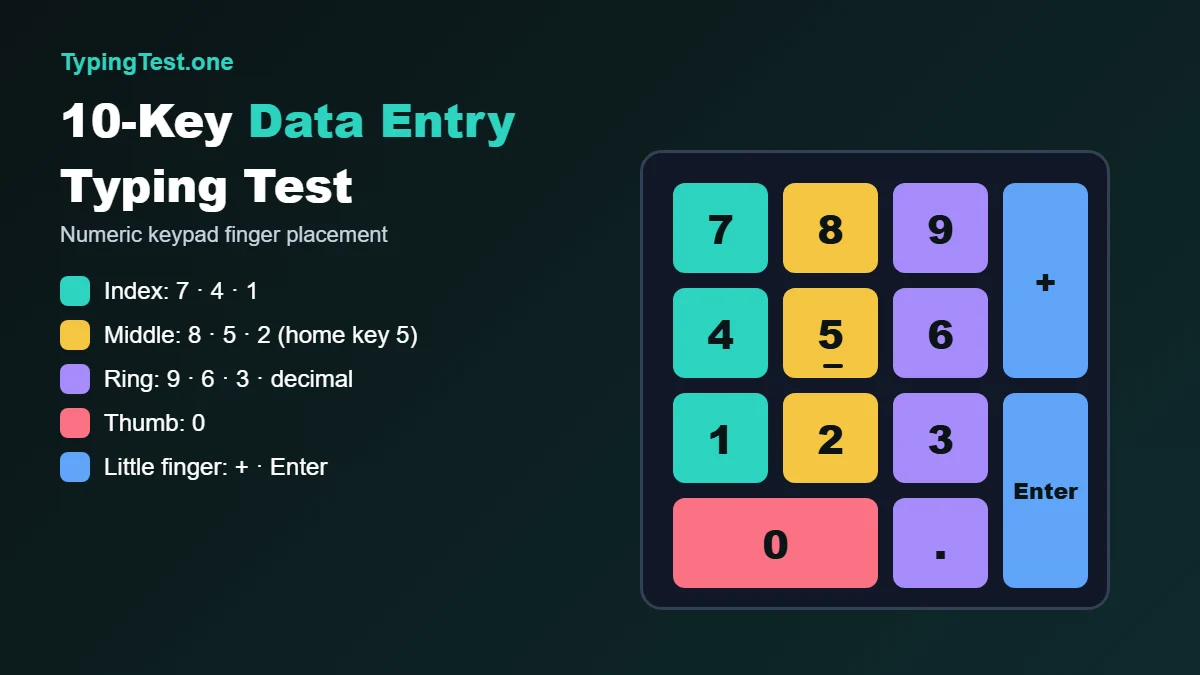
The 10-key test uses only the numeric keypad. Correct technique:
Home row: index finger on 4, middle finger on 5 (the key with the bump), ring finger on 6.
Thumb: 0.
Little finger: Enter, + and −.
Keep your wrist still and move only the fingers, exactly like touch typing on letters.
10-key benchmarks
Level | Numeric KPH |
|---|---|
Beginner | below 8,000 |
Entry-level job standard | 8,000–10,000 |
Proficient | 10,000–12,000 |
Expert | 12,000+ |
No numeric keypad? Many laptops do not have one. A USB numeric keypad costs very little and is worth it if you are applying for accounting or billing roles where a 10-key test is common.
Free 10-key drill (5 minutes a day)
Open a blank spreadsheet and type these columns as fast as possible, pressing Enter after each number. Check every value at the end:
Drill | Content | Goal |
|---|---|---|
Drill 1 | 456, 654, 465, 546, 645 | Home row without looking |
Drill 2 | 789, 123, 741, 852, 963 | Top and bottom rows |
Drill 3 | 1,045.20 / 3,980.75 / 207.09 | Decimals |
Drill 4 | 00418273 / 10092384 | Leading zeros and IDs |
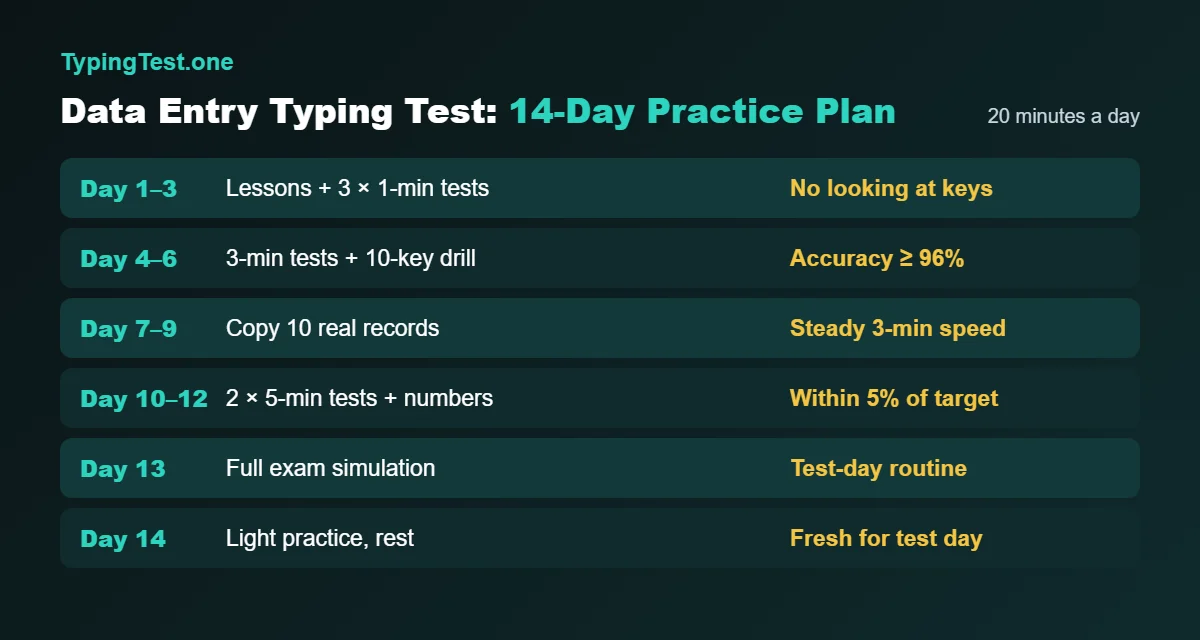
A 14-Day Practice Plan to Pass Your Data Entry Typing Test
Fifteen to twenty-five minutes a day is enough. Consistency beats long sessions.
Days | Daily routine (20 min) | Target by end of phase |
|---|---|---|
1–3 | 10 min lessons (finger placement) + 3 × 1-minute tests | No looking at the keyboard |
4–6 | 5 min warm-up + 3 × 3-minute tests (Technical category) + 5 min 10-key drill | Accuracy ≥ 96% |
7–9 | Copy 10 real records (alphanumeric) + 2 × 3-minute tests | Steady speed across 3 minutes |
10–12 | 2 × 5-minute tests + 5 min numbers | Within 5% of target WPM |
13 | Full simulation: 5-minute test + 10 records + 10-key drill | Exam-day routine |
14 | Light practice only (10 min), rest your hands | Fresh for test day |
Track every result in a simple table (date, test length, WPM, accuracy). Seeing the line go up is the best motivation, and you can compare yourself with others on our leaderboard.
12 Proven Tips to Score Higher
Never look at the keyboard. Every glance costs you about half a second and your place in the text.
Read one word ahead. Your eyes should always be slightly ahead of your fingers.
Use the Tab key to move between form fields, never the mouse.
Do not correct every small error instantly on tests that allow it; check the scoring rules first. On data entry tests that penalize errors heavily, fix mistakes immediately.
Keep a steady rhythm. Even keystrokes beat bursts of speed followed by pauses.
Master Shift with the opposite hand. Left Shift for right-hand letters and right Shift for left-hand letters.
Learn the number row if your test does not allow the keypad.
Sit correctly: feet flat, elbows at about 90 degrees, screen at eye level.
Warm up for 3 minutes before the real test.
Use the same keyboard you will use on test day when possible (laptop vs external keyboard changes results).
Practice with real data: copy addresses from a contact list or invoices from an email.
Sleep well before test day. Tired fingers make more errors than nervous ones.
For more speed techniques, read our guide on how to reach 100 WPM.
Common Mistakes That Cost You the Job
Mistake | Why it hurts | Fix |
|---|---|---|
Practicing only with plain sentences | Real tests include numbers and symbols | Use the Technical category and real records |
Chasing speed, ignoring accuracy | Net score drops, error rate looks unreliable | Stay above 97% before speeding up |
Taking the test on an unfamiliar keyboard | Key spacing and feel change | Practice on the same device |
Using one finger on the keypad | Very slow numeric KPH | Learn the 4-5-6 home row |
Starting the 5 or 10-minute test too fast | Fatigue and errors in the second half | Start at 90% of your max speed |
Not reading the instructions | Some tests require exact capitalization and spacing | Read twice before starting |
Data Entry Jobs: Pay and Outlook in Numbers
According to U.S. Bureau of Labor Statistics data (Occupational Employment and Wage Statistics, May 2025), data entry keyers in the United States earned a median annual wage of $41,340 (about $19.88 per hour), with around 127,000 people employed in the occupation (BLS OEWS; figures as compiled by Wagedex).
The same projections show employment in this occupation declining by roughly 26% between 2024 and 2034, largely because of automation such as OCR and AI, while still producing about 9,500 openings per year from people leaving the field.
What this means for you: pure data entry jobs are shrinking, so the candidates who get hired are the ones who are both fast and very accurate, and who can also handle related tasks (spreadsheets, customer records, document review). A strong data entry typing test score is your first proof of reliability.
Free Data Entry Typing Test vs Paid Employer Tests
Free online test (TypingTest.one) | Employer / pre-employment test | |
|---|---|---|
Cost | Free, no sign-up | Paid by the employer |
Purpose | Practice and self-assessment | Hiring decision |
Attempts | Unlimited | Usually one |
Formats | 1, 3, 5 min, several text categories | WPM, alphanumeric, numeric, 10-key |
Feedback | Instant WPM and accuracy | Report sent to the employer |
Best use | Train until your average meets the job requirement | Take it only when you are consistently ready |
Frequently Asked Questions
What is a good score on a data entry typing test?
For most entry-level data entry jobs, 40–45 WPM with at least 95–97% accuracy is a good score. That is roughly 12,000–13,500 KPH. Competitive and high-volume roles look for 50–60 WPM or more.
How do I convert WPM to KPH?
Multiply your WPM by 300. For example, 40 WPM × 300 = 12,000 KPH. To go the other way, divide KPH by 300.
How long is a data entry typing test?
Most data entry typing tests last 3 to 5 minutes. Some employers use 10-minute tests to measure endurance, and 10-key tests usually last 3 to 5 minutes.
Can I use the numeric keypad during a data entry typing test?
It depends on the test. 10-key and numeric tests are designed for the keypad. Alphanumeric tests usually allow both the number row and the keypad, but switching hands costs time, so practice with the method you will actually use.
How can I improve my data entry speed fast?
Practice 20 minutes a day for two weeks: touch typing lessons first, then timed 3-minute tests, real records with the Tab key, and a 5-minute numeric drill. Focus on accuracy above 97% before pushing speed.
Is a data entry typing test hard?
It is not hard if you prepare. The difficulty comes from mixed content (numbers, capitals, symbols) and the pressure of a single attempt. Simulating the real format two or three times before test day removes most of the stress.
Do remote data entry jobs require a typing test?
Many do. Remote employers and freelance platforms often ask for a typing test result or certificate because they cannot watch you work. Keep a recent, honest result of your average speed and accuracy.
Conclusion
A data entry typing test is one of the easiest hiring hurdles to prepare for, because everything about it is measurable: WPM, KPH and accuracy. Aim for 45 WPM (about 13,500 KPH) with at least 97% accuracy, practice the exact format your employer uses (alphanumeric, numeric or 10-key), and follow the 14-day plan above.
Start today: take the free typing test on TypingTest.one, record your baseline, and repeat it every day. In two weeks you will know exactly where you stand, and you will walk into your data entry typing test ready to pass.
Last updated: November 2026
Rate this article
Be the first to rate
Related Articles
How to Fix a Keyboard That’s Not Typing: 11 Proven Solutions
Is your keyboard not typing? Discover 11 proven fixes, from quick hardware checks to driver updates and Windows settings, to get your keys working again fast.
Why Your Keyboard Stopped Typing (and How to Fix It in Minutes)
Is your keyboard not typing? Discover 12 proven fixes, from driver resets to hardware checks, that get you back to work in minutes. No tech skills needed.
How to Crack the CPCT Typing Test: A Step-by-Step Guide
Learn how to crack the CPCT typing test with our step-by-step guide. Discover the syllabus, scoring, practice tips, and common mistakes to avoid for a high score.